
What Is Form 16 and How Do You Use It to File Your ITR? Complete Guide for 2026

Every June, the same thing happens in offices across India. HR sends an email saying Form 16 has been uploaded to the employee portal. Half the people download it immediately and file their taxes. The other half open it, see pages of numbers with section references and PAN details and TDS certificates, close it, and call their CA.
Form 16 is genuinely not complicated once someone explains what you’re actually looking at. The problem is that most explanations are written by tax professionals for other tax professionals. This one isn’t.
This is everything you need to know about Form 16 for FY 2025-26 — what it contains, how to read it, and exactly how to use it to file your ITR before the July 31, 2026 deadline without needing a CA.
What this article covers
What Form 16 actually is
Form 16 is a TDS certificate. Nothing more, nothing less.
Every month your employer deducts tax from your salary before crediting it to your account. That deducted amount goes directly to the government. Form 16 is the official document your employer gives you at year-end confirming: here is how much salary we paid you this year, here is how much tax we deducted, and here is how we arrived at that number.
Think of it as a summary report of your entire financial year as seen from your employer’s payroll system. Your gross salary, the HRA exemption you claimed, the 80C investments you declared, the TDS calculated month by month — all of it is documented in Form 16.
When you go to file your ITR, the income tax portal pre-fills data based on what your employer has already reported. Form 16 is your way of verifying that pre-filled data is correct — and correcting it if it isn’t.
Your employer is legally required to issue Form 16 by June 15, 2026 for FY 2025-26. If they deducted TDS and haven’t given you Form 16, they’re violating CBDT Rule 31(3). Late issuance attracts a penalty of ₹100 per day per certificate under Section 272A(2)(g).
The 2026 update everyone needs to know: Form 16 becomes Form 130
India has a new Income Tax Act — the Income Tax Act 2025 — which replaces the Income Tax Act 1961 from April 1, 2026, for Tax Year 2026-27 onwards.
Under the new Act, Form 16 has been renumbered as Form 130. The content and purpose remain exactly the same. Only the name changes.
What this means practically:
- For FY 2025-26 (the year you’re filing ITR for now, due July 31, 2026): your employer issues Form 16 as usual. Nothing changes for you.
- From FY 2026-27 onwards (Tax Year 2026-27, starting April 1, 2026): your employer will issue Form 130 instead of Form 16. Same document, new number.
- June 2026 will be the last time employers issue Form 16. From June 2027 onwards, it will be Form 130.
Don’t let this confuse you. For your current ITR filing, look for Form 16. That’s what your employer will provide.
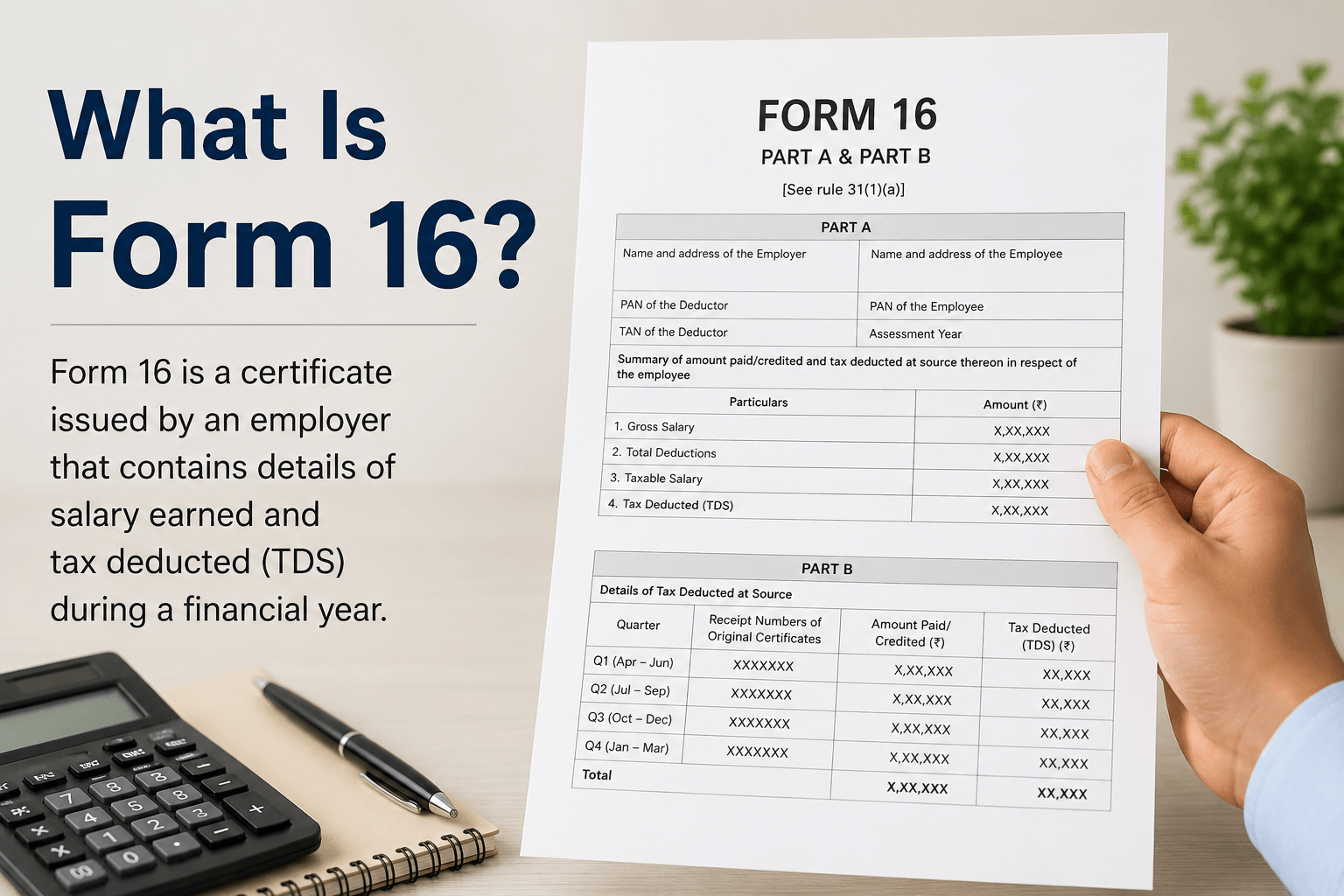
Form 16: Part A and Part B explained
Form 16 has two sections. They are generated differently, contain different information, and serve different purposes.
Part A — the TDS certificate
Part A is generated by your employer directly from the TRACES government portal (Traces.in). It cannot be self-made or modified by the employer — it pulls data directly from TDS returns filed with the government.
What Part A contains:
- Your name, PAN, and address
- Employer’s name, TAN (Tax Deduction Account Number), and address
- Assessment Year (AY 2026-27 for FY 2025-26)
- Quarter-wise breakdown of TDS deducted and deposited to the government
- Total TDS for the year
- A unique TDS certificate number
Part A has a digital signature from the employer. This is what validates it. An unsigned or manually created Part A is not legally valid.
How to verify: Cross-check the total TDS in Part A against your Form 26AS on the income tax portal. They should match exactly. If they don’t, there’s a discrepancy in your employer’s TDS filing that needs to be resolved before you file your ITR.
Part B — your salary and tax computation
Part B is prepared by your employer’s payroll department. It’s an annexure to Part A and contains the detailed breakdown of your income, exemptions, and deductions.
What Part B contains:
- Gross salary paid during the year
- HRA exemption claimed (if you submitted rent receipts)
- Standard deduction (₹75,000 under new regime; ₹50,000 under old regime)
- Other exemptions under Section 10
- Deductions claimed: 80C, 80D, 80CCD(1B), HRA under old regime
- Total taxable income as computed by employer
- Tax on taxable income
- TDS deducted month by month
- Net tax payable or refundable
Part B is where most people look first — and where most errors hide. If you declared investments to HR but they weren’t reflected in Part B, you’ve paid excess TDS. You’ll get it back as a refund when you file ITR correctly.
How to open, download, and verify your Form 16
Opening Form 16
Form 16 from most companies comes as a password-protected PDF. The password is usually one of these:
- PAN in uppercase (example: ABCDE1234F)
- PAN in uppercase + date of birth in DDMMYYYY format (example: ABCDE1234F01011990)
- Date of birth alone in DDMMYYYY format
If none of these work, contact your HR or payroll team for the correct password. Do not share Form 16 with anyone who doesn’t need it — it contains your full income details.
Downloading Form 16 Part A from TRACES
If your employer hasn’t given you Part A or you want to verify independently:
- Go to incometax.gov.in and log in with your PAN
- Go to e-File — Income Tax Returns — View Form 26AS or AIS
- Alternatively, employees can access TRACES at tdscpc.gov.in to download Form 16 Part A using PAN and date of birth
Verifying Form 16 against Form 26AS
This is the most important verification step:
| What to check | Form 16 location | Form 26AS location | Should match? |
| Total TDS deducted | Part A — total TDS row | Part A (TDS on salary) | Yes — exactly |
| Employer TAN | Part A — employer details | Part A — deductor TAN | Yes — exactly |
| Gross salary | Part B — salary section | Not shown directly — use AIS | Cross-check with payslips |
| PAN details | Header of Part A | Your account details | Yes — exactly |
If TDS in Form 16 Part A doesn’t match Form 26AS, your employer may not have deposited the correct amount. This needs to be corrected before you file — contact HR and ask them to file a revised TDS return (Form 24Q).
Step-by-step: using Form 16 to file ITR-1
This walkthrough assumes you’re filing ITR-1 (Sahaj) — the form for salaried individuals with total income up to ₹50 lakh and no business income. The deadline for FY 2025-26 is July 31, 2026.
Step 1 — Log in to the portal: Go to incometax.gov.in. Log in with your PAN and password. Under e-File, click Income Tax Returns — File Income Tax Return.
Step 2 — Select AY 2026-27 and ITR-1: Assessment Year: 2026-27. Mode: Online. Continue.
Step 3 — Check pre-filled data: The portal pre-fills your salary income from your employer’s TDS filings. Open your Form 16 Part B alongside the portal and compare line by line. Gross salary, HRA exemption, standard deduction, net salary — verify each one.
Step 4 — Enter deductions: If you’re on the old tax regime, enter your deductions in the ‘Deductions’ section. Use Part B of Form 16 as your reference. 80C amount, 80D premium, HRA claimed — it’s all in Part B. Don’t retype if Part B is already pre-populated; just verify.
Step 5 — Add other income: Form 16 covers only your salary income. Any interest from savings accounts, FD interest, dividends, or other sources must be added separately. Check your AIS for this.
Step 6 — Verify tax computation: The portal calculates tax payable or refundable. Compare against Part B of Form 16. If there’s a difference, check whether you’ve added other income or missed any deductions.
Step 7 — Pay any tax due, submit, and e-verify: If tax is payable, pay via Challan 280 before submitting. After submission, e-verify using Aadhaar OTP immediately. Without e-verification, the return is not complete.
What to do if you changed jobs and have two Form 16s
This is where most job-changers get into trouble.
When you switch employers mid-year, each employer calculates TDS as if they were your only employer for the year. Neither knows about the other’s salary. The combined income often pushes you into a higher tax slab — meaning each employer underdeducted TDS and you owe additional tax at filing.
What to do:
- Collect Form 16 from both employers. Each will have Part A and Part B.
- In the portal, add both salary incomes. Don’t just use one and ignore the other.
- The portal’s pre-filled data should show both if both employers filed TDS correctly.
- Verify: does the combined gross salary match what you actually earned across both jobs? Check with your payslips.
- Calculate combined tax liability. There’s likely a shortfall. Pay the balance via Challan 280 before filing.
This situation is extremely common. Don’t panic. The math isn’t complicated once you have both Form 16s in front of you. Use ClearTax’s free filing tool if you’re unsure — it handles two Form 16s gracefully.
What if your employer hasn’t issued Form 16 by June 15?
First step: email HR formally on June 16 if you haven’t received it. Keep the email for records. Your employer is legally obligated to issue it.
If they still don’t provide it: you can still file your ITR without Form 16. It’s not mandatory to have Form 16 — it just makes the process easier.
Without Form 16, gather:
- All monthly salary slips for April 2025 to March 2026
- Form 26AS from the income tax portal — this shows TDS deposited against your PAN
- AIS (Annual Information Statement) from the portal for complete income picture
- Investment proofs you submitted to HR during the year
From these documents you can reconstruct your income and TDS figures accurately enough to file. The portal’s pre-filled data already has most of what you need — Form 16 is primarily a verification tool.
Common Form 16 errors and how to fix them
Error 1: Investment not reflected in Part B. You submitted rent receipts and LIC premium to HR but Part B doesn’t show them. This means your employer didn’t process the declaration. Contact HR immediately. If Form 16 has already been issued, you can still claim the deduction correctly when filing ITR — the portal allows you to override pre-filled data. You’ll get the excess TDS back as refund.
Error 2: Wrong PAN on Form 16. If your PAN is incorrectly mentioned in Part A, the TDS doesn’t reflect in your Form 26AS. This is a serious issue. The employer needs to file a revised TDS return correcting the PAN and reissue Form 16. Don’t file ITR with an incorrect PAN on Form 16.
Error 3: Salary mismatch between Part B and payslips. If gross salary in Part B doesn’t match the total from your payslips, something is off. Check whether any month’s salary was processed late or if perquisites were included. Ask HR to clarify before filing.
Error 4: TDS in Part A doesn’t match Form 26AS. This means your employer deducted TDS but didn’t deposit it correctly or filed the TDS return with errors. You should not claim more TDS credit than what appears in Form 26AS. Resolve this with your employer first.
Form 16 is, at its core, a summary of everything your employer told the government about you this year. Your job when filing ITR is simply to verify that summary is accurate and add anything it missed.
Most salaried people find that once they understand what Part A and Part B actually contain, the whole ITR filing process clicks into place. Form 16 is the anchor. Everything else — the portal, the pre-filled data, the tax computation — follows from it.
Get Form 16 by June 15. Open it by June 20. File by July 31. You’re done for the year.
Related reading on The Salary Investor:
• How to File Your ITR Yourself in 2026 — Step-by-Step Guide for Salaried Indians
• Old Tax Regime vs New Tax Regime: Which One Should You Pick in FY 2025-26?
• Section 80C Tax Saving Complete Guide for Salaried Indians in 2026
• What is HRA and How Do I Claim It? A Simple Guide for Salaried Indians
• How to Read Your Salary Slip — Every Component Explained in Plain English
Disclaimer: Form 16 issuance deadline of June 15, 2026 is as per CBDT Rule 31(3) of the Income Tax Rules, 1962, confirmed from ClearTax (May 2026), Paytm (April 2026), FirstReports (May 2026), and Futurex Solutions (April 2026). Penalty of ₹100/day under Section 272A(2)(g) for late Form 16 issuance is as per Income Tax Act, 1961. Form 16 renaming to Form 130 under the new Income Tax Act 2025 is effective from Tax Year 2026-27 (April 1, 2026 onwards) — for FY 2025-26 ITR (due July 31, 2026), Form 16 applies as usual. ITR-1 filing deadline of July 31, 2026 is per CBDT notification. This article is for general educational purposes only and does not constitute tax or financial advice. Please consult a qualified CA for advice specific to your situation.
Sources: Form 16 FY 2025-26 — employer deadline June 15, 2026; Form 130 update under IT Act 2025 (ClearTax, May 2026) · Form 16 for FY 2025-26 — Part A and Part B explained, password format, digital signature (Paytm, April 8, 2026) · Form 16 — deadline June 15, 2026; penalty ₹100/day under Section 272A(2)(g); two Form 16s when changing jobs (FirstReports, May 2026) · Form 16 for FY 2025-26 employer guide — TRACES, Form 130 replaces Form 16 from Tax Year 2026-27 (Futurex Solutions, April 6, 2026) · Form 16 meaning, Part A and Part B, Form 130 update 2026 (HR Software Delhi, April 10, 2026) · ITR filing deadline July 31, 2026; Form 26AS vs AIS for FY 2025-26 (ClearTax, April 2026)

He figured out most of what he knows about personal finance not from courses or advisors, but from years of reading, making mistakes, and fixing them. The Salary Investor is his attempt to save other salaried Indians the same time and money.
He is not a CA or a SEBI-registered advisor. He writes as a fellow salaried person who has been in the trenches — navigating EPF, ITR, 80C, salary slips, and market volatility.
- Gratuity Before 5 Years: The Legal Reality vs What HR Tells You - September 20, 2026
- ESOP Taxation in India 2026: When You’re Taxed, How Much, and What to Do at Each Stage - August 20, 2026
- How to Claim HRA Exemption If You Pay Rent to Parents — The Complete Legal Guide - August 16, 2026